Practise piano with your MIDI keyboard or digital piano
Plug your keyboard into a computer and open the trainer in Chrome or Edge. It plays short melodies on your piano and listens while you play them back.
100% free, no signup required.
How to connect your digital piano to your computer
-
Use a USB cable
Look for a USB port marked USB to Host or Computer, often on the back. The socket is usually a square USB-B or a USB-C. Run a cable from it to a USB-A or USB-C port on your computer. A keyboard with only round 5-pin MIDI sockets needs a USB MIDI interface in between.
-
Check whether it needs a driver
Class-compliant keyboards need none. Windows, macOS, ChromeOS and Linux see them as soon as they’re plugged in. Some older models need a driver from the maker’s website.
-
Open the trainer and allow MIDI
Chrome and Edge ask whether the site may use your MIDI devices. Allow it. The permission lets the trainer hear your keys and send melodies to the piano, so they play through its own speakers in its own sound. If you clicked Block, the trainer shows MIDI blocked; allow it from the site settings in the address bar, then reload.
-
Check it’s picked up
The trainer chooses your keyboard by itself, preferring one with piano or Roland in its name, and shows its name on the menu button at the top. With more than one MIDI device, choose in Settings, in that menu, under Piano. Test sound there plays C, E, G, C.
On an Android phone or tablet, Chrome has Web MIDI too, so a keyboard on a USB-OTG adapter should work the same way. It hasn’t been tested on every device.
MIDI keyboard or digital piano?
A digital piano has its own speakers and piano sound, so the trainer plays each melody through it and you hear it from the instrument you’re playing. Most MIDI controller keyboards make no sound of their own. With one of those, set Play on to Browser piano in Settings and the melodies play through the computer instead.
Digital pianos usually have full-size weighted keys that feel close to an acoustic piano. Controllers range from mini keys to full size. For ear training either one works, since the trainer only needs to know which key you pressed.
What works where
| Chrome or Edge on Windows, macOS, Linux or ChromeOS, with a USB MIDI keyboard or digital piano | Everything. Melodies play on the piano and you answer on its keys. |
|---|---|
| Chrome on an Android phone or tablet, with the keyboard on a USB-OTG adapter | Should work the same way, since Chrome on Android has Web MIDI. It hasn’t been tested on every device. |
| Safari on a Mac, and any browser on an iPhone or iPad | No Web MIDI, so the trainer can’t hear your piano. You get the on-screen keyboard and the browser’s piano sound. |
| Firefox | Firefox asks you to install a site-permission add-on before it shares MIDI devices. Chrome and Edge ask for a permission only. |
| No MIDI keyboard | The on-screen keyboard opens by itself when no MIDI keyboard is found, and melodies play in the browser. The staff, hints, scoring and stats all work the same. |
Play piano online with a MIDI keyboard
Once it’s connected, you can practise without touching the computer. On an 88-key piano, hold the lowest A to replay the melody and hold the top C to skip to the next one. With Move on by itself on (the default), the next melody plays a moment after you solve one.
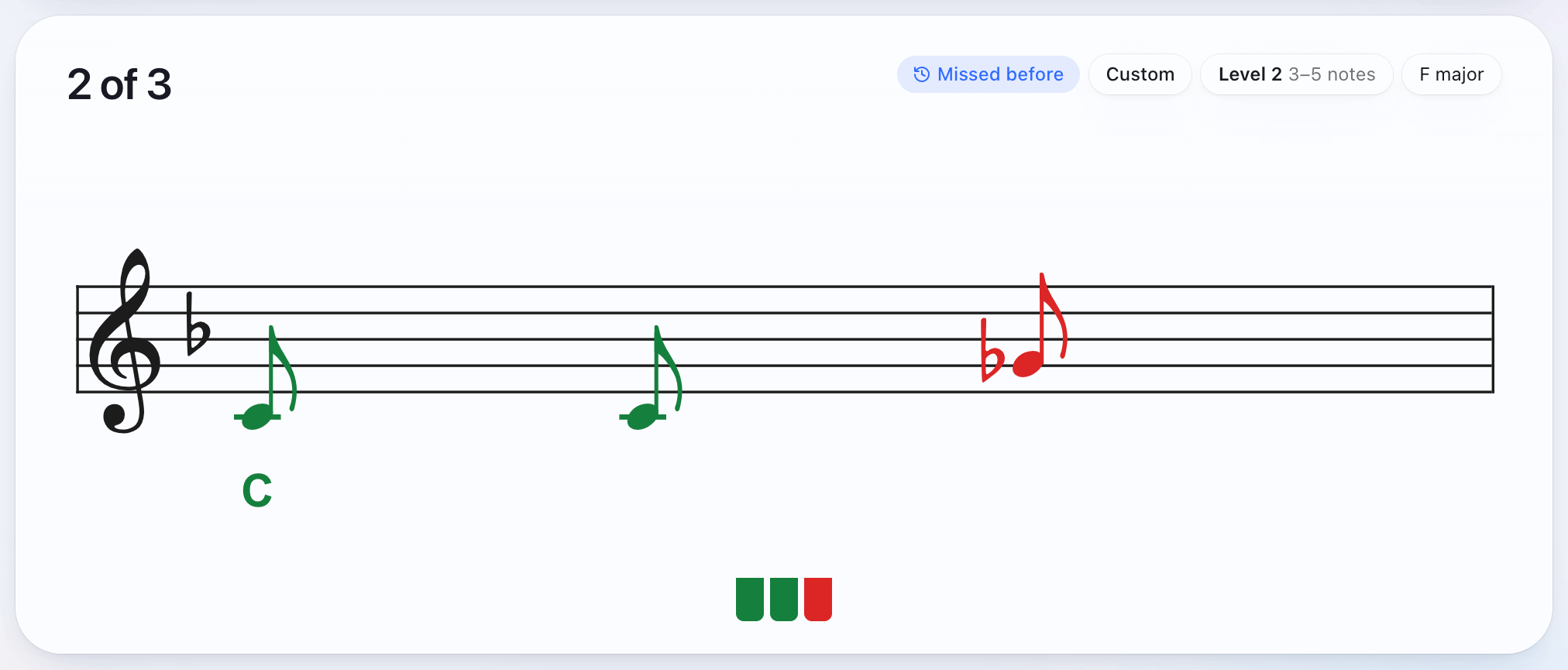
Every note you play is checked as you play it. A right note goes onto the staff in green, and a wrong one shows in red at the pitch you played. Your history stays in the browser, so there’s nothing to sign in to.
If you’re new to this, start with the method for playing by ear or the songs in the trainer.
Questions
What can I do with the USB port on my digital piano?
Most digital pianos have a square USB port, marked something like USB to Host or Computer. A cable from it to a computer, tablet or phone lets apps hear what you play and play sounds back. You can practise ear training and play-by-ear exercises like the ones here, record what you play in GarageBand or another recording app, enter notes into notation software such as MuseScore by playing them, and play other instruments’ sounds from the computer. A flat USB port, if your piano has one, is usually for a memory stick, to play or record songs. It doesn’t connect to a computer.
Can you learn piano on a MIDI keyboard?
Yes. A MIDI keyboard tells the computer which key you pressed, when and how hard, and the trainer checks your playing from that. For ear training and reading, any MIDI keyboard works. A digital piano with weighted keys feels closer to an acoustic piano, which helps with technique.
Is a small keyboard enough?
Yes. The trainer’s tunes sit between the G below middle C and the C two octaves above it, and with Any octave on (the default) a note counts in whichever octave you play it, so 25 keys are enough.
Why does the browser ask for access to MIDI devices?
Chrome and Edge ask before any site can use MIDI. Allowing it lets the trainer hear the keys you play and send melodies to your piano, so they play through its own speakers in its own sound. If you clicked Block, the trainer shows MIDI blocked; allow it from the site settings in the address bar, then reload.
Does it work on an Android phone or tablet?
It should. Chrome on Android has Web MIDI, so a keyboard connected through a USB-OTG adapter, or a USB-C to USB-B cable, works the same way as on a computer. It hasn’t been tested on every device.
What if the melody plays in the wrong sound, or not at all?
Change the MIDI channel in Settings. The trainer starts on channel 4, which is where the Roland FP-30X plays its panel sound. On another piano, try channel 1. Test sound in Settings plays C, E, G, C, so you can check.
Is MIDI the same as audio?
No. MIDI sends messages about the keys: which one, when and how hard. The sound comes from the piano or the browser. So the trainer needs no microphone, and there’s no delay from recording sound and working out its pitch.
Can I use it without a MIDI keyboard?
Yes. When no MIDI keyboard is found, the on-screen keyboard opens by itself and the melodies play through a sampled piano in the browser. The staff, hints, scoring and stats work the same.